
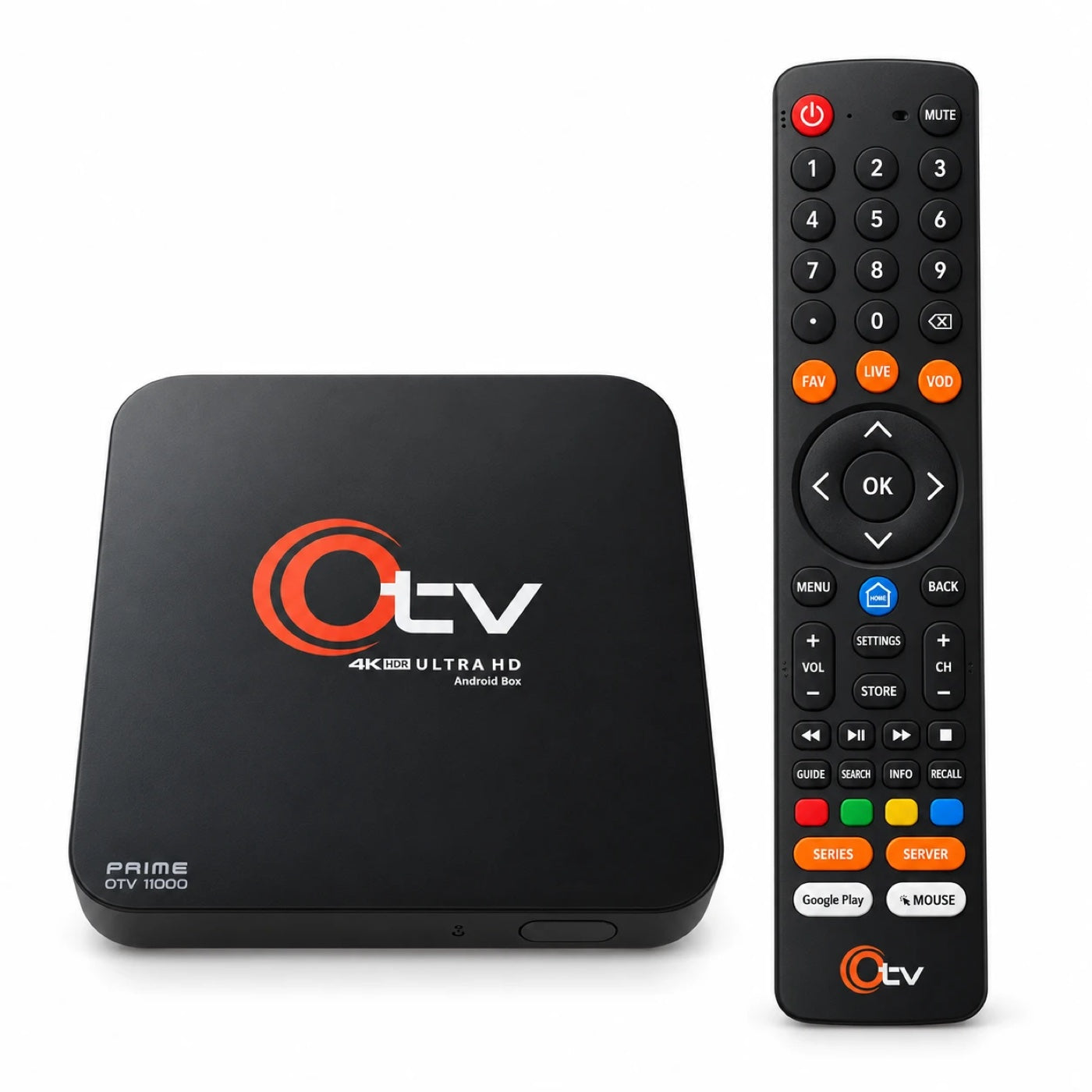
Now available
OTV Prime 11000
4K Smart TV Box
$149.99 Free shipping in Canada
Make your TV a smart TV. Plug OTV into the HDMI port of any television and get live TV, movies and series, catch-up and your apps on one home screen.
- Turns any TV with an HDMI port into a smart TV
- 4K HDR picture at up to 60 frames a second
- Android 14 with Google Play built in
- 4 GB memory and 16 GB storage, extendable up to 120 GB
- Dual-band Wi-Fi, Ethernet and Bluetooth 5.0
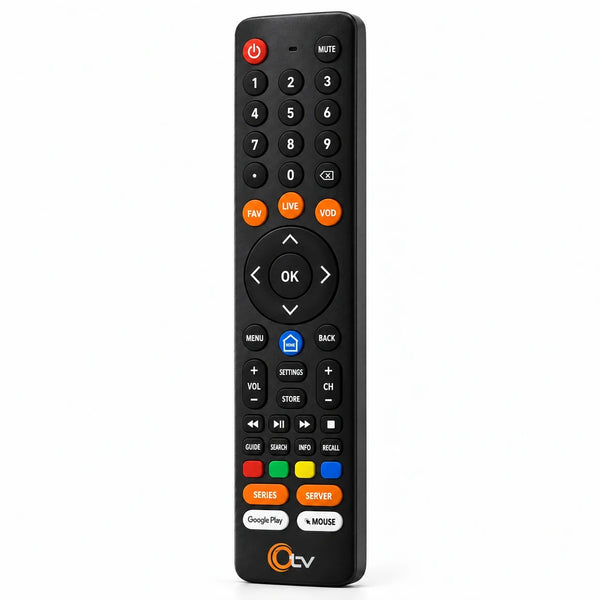
- Bluetooth remote with Live, VOD and Fav keys
- 7-day returns
- 3-month warranty
- Secure checkout
- Free shipping across Canada
- Questions? Contact us
 Sold by TechX
In the box OTV Prime 11000, Bluetooth remote, HDMI cable, Ethernet cable and power adapter.
TechX and OTV do not provide any TV channels, streaming subscriptions or services.
-
7-day returnsFrom the day it arrives
-
3-month warrantyFrom TechX
-
Free shippingAnywhere in Canada
-
Secure checkoutEncrypted payment
Smart TV box
Not a smart TV? It is now.
You don't need a new television. If your TV has an HDMI port, OTV adds apps, streaming and a modern home screen in a few minutes.
Plug it in.
Connect the HDMI cable from the box to a free HDMI port on your TV, then the power adapter.
Get online.
Join your Wi-Fi, or plug in the Ethernet cable that comes in the box.
Add your apps.
Android 14 with Google Play is built in. Install the apps you use and press play.
Works with HD, Full HD and 4K televisions. Older sets without HDMI can use the AV output on the back of the box.
Why a box
Box, stick or a new TV?
Three ways to make a TV smart. Here is how they differ.
| OTV Prime 11000 | Streaming stick | New smart TV | |
|---|---|---|---|
| Works with the TV you already have | Yes | Yes | No, you replace the TV |
| Wired Ethernet port | Built in | Usually needs an adapter | Varies |
| USB ports for extra storage | Two | Usually none | Varies |
| AV output for older TVs | Yes | No | Not needed |
| Memory for apps | 4 GB | Often less | Varies |
| Can be replaced when it gets slow | Yes | Yes | No, it is built into the TV |
Sticks and smart TVs vary by model. Check the one you are comparing.
On the box
The specs, at a glance.
Everything you love to watch. In one device.

OTV Prime 11000 is a 4K smart TV box that puts live TV, movies and series, catch-up and your apps on one home screen, in 4K HDR at sixty frames a second. With a new Bluetooth remote, dual-band Wi-Fi or Ethernet and Google Play built in, everything you watch is one press away.
The screen above introduces the OTV set-top box. The content shown is for illustration purposes only.
Performance
Sharp. Bright. Smooth.
4K HDR
4K picture.
Four times the detail of Full HD, with HDR10 and HLG for brighter highlights and deeper shadows, at up to sixty frames a second so fast action stays smooth.
4 GB
Power to keep up.
A quad-core processor, a five-core GPU and 4 GB of memory keep the menus quick and the picture moving.
16 GB
Room for your apps.
16 GB of storage is built in, and it is extendable up to 120 GB with an external USB drive plugged into a USB-A port on the side of the box.
AV1
Hardware decoding.
Hardware decoding for AV1, VP9, HEVC and more does the heavy lifting on video.
4K requires a compatible 4K TV and content. HDR requires a compatible HDR TV and content. Such content is not available on all audio-video streams or files. Please check with your service or content provider for availability.
Make it yours
Set it up your way.
Lock what you want kept private, choose what opens first, change the view, and keep it all running fast.
AppLock
Keep it private. Put a password on the apps you choose.
AutoStart
Open where you want. Choose the app that starts when the box turns on.
Backgrounds
Change the view. Pick a picture and it fills the whole home screen.
Built-in cleaner
One press, more room. Clears out leftover files to keep everything running fast.
Experience
One home. Everything starts here.
Live TV, VOD, TV Series, Favorites and Settings sit in one row, so anyone in the house can find their way around.

One home.
Everything starts from the same screen, with a background you choose.

Live TV.
Channels are sorted by category, with a guide beside them showing what is on now and what is next.

Movies and series.
VOD and TV Series each have their own place, sorted into categories you can move through in seconds, with 4K titles marked.

Favorites.
Press the yellow key on any channel to keep it. Your list is then one press away, on the FAV key.
The pictures show the OTV applications. The content shown is for illustration purposes only. We do not provide any TV channels, subscriptions or any other audio-video content.
Bluetooth remote
One press away.

Live. VOD. Fav.
Three keys that jump straight to live TV, movies and series, and your favourites.
Bluetooth and infrared.
The remote connects over Bluetooth 5.0, with infrared built in too.
Find your way.
A directional pad with OK in the middle, and Menu, Home and Back right underneath.
Four colour keys.
Lock a channel, open catch-up, add a favourite or hide what you don't watch.
And the rest.
Series, Google Play, and a Mouse key for apps that need a pointer.
Pairing the remote
Long press the “OK” and “VOLUME UP” keys together for 3 seconds and wait for the red LED indicator to start blinking. “OTV Remote” will appear in “Remotes & Accessories”.
Connection
Wireless or wired. Your call.
Dual-band Wi-Fi for anywhere in the house, Ethernet when you want the steadiest line, and the ports to connect the rest.

Back
HDMI for your television, AV for older sets, Ethernet, power and the power button.

Side
Two USB ports.
Dual-band Wi-Fi
Pick the clearer lane. Connect on 2.4 GHz for range or 5 GHz for speed.
Bluetooth 5.0
Built in. For the remote, and for the Bluetooth accessories you pair with it.
Screen sharing
From your phone to the big screen. Show what is on your phone on the television.
OTV Prime 11000
Tech Specs.
| Processor | Quad-core processor Five-core GPU |
|---|---|
| Capacity | 4 GB memory (LPDDR4) 16 GB storage (eMMC) Extendable up to 120 GB with an external USB drive plugged into a USB-A port on the side |
| System | Android 14 Google Play Apps Market Built-in cleaner, AppLock, AutoStart and background images |
| Video formats | 4K at up to 60 fps HDR10 and HLG AV1 (Main 10 profile) up to 60 fps VP9 up to 4K at 60 fps HEVC / H.265 (Main 10 profile) AVC / H.264 (High profile) AVS+ up to 1080p at 60 fps Hardware video decoding |
| Back | HDMI Ethernet AV output (RCA) Power input Power button |
| Side and wireless | Two USB ports Dual-band Wi-Fi (2.4 GHz and 5 GHz) Bluetooth 5.0 wireless technology IR receiver Screen sharing |
| Remote | Bluetooth wireless technology IR transmitter Direct keys for Favorites, Live TV and VOD Four colour keys for lock, catch-up, favourite and hide Series, Server, Google Play and Mouse keys Number keys, volume, channel and playback controls |
| Design | Finish: Black Front: Power indicator and infrared receiver |
| Requirements | Television with an HDMI or AV input Wi-Fi or Ethernet internet connection 4K requires a compatible 4K TV and content; HDR requires a compatible HDR TV and content |
| In the box | OTV Prime 11000 Bluetooth remote HDMI cable Ethernet cable Power adapter |
4K requires a compatible 4K TV and content. HDR requires a compatible HDR TV and content. Such content is not available on all audio-video streams or files. Please check with your service or content provider for availability.
In the box
Everything you need to get started.

OTV Prime 11000, Bluetooth remote, HDMI cable, Ethernet cable and power adapter.
Questions
Good to know.
What is OTV Prime 11000?
OTV Prime 11000, often called the OTV 11000 or simply the OTV box, is a 4K HDR smart TV box and media player. It runs Android 14 with Google Play built in and has a quad-core processor, 4 GB of memory, 16 GB of storage, dual-band Wi-Fi, Ethernet, Bluetooth 5.0 and a Bluetooth remote.
Does OTV provide TV channels, movies or a streaming subscription?
No. OTV makes the box and its remote, and TechX sells them. Neither provides any TV channels, media streaming subscriptions or services, or any other audio-video content, and neither has any affiliation with any third-party providers.
Can OTV make my regular TV a smart TV?
Yes. Plug the box into an HDMI port on any television, connect it to the internet, and the TV gains an Android home screen and apps.
What comes in the box?
The OTV Prime 11000 box, the Bluetooth remote, an HDMI cable, an Ethernet cable and a power adapter.
How do I connect it to my TV?
Plug the HDMI cable into the box and into your television, connect the power adapter, and switch the television to that HDMI input. Older televisions without HDMI can use the AV output on the back of the box. Then connect to the internet with Wi-Fi or the Ethernet cable.
Is OTV an IPTV box?
OTV Prime 11000 is an Android TV box with Live TV, VOD, catch-up and Favorites screens, so it can be used as an IPTV player with a service you already have from a provider. OTV itself does not provide any channels or subscriptions.
How do I pair the remote?
Long press the “OK” and “VOLUME UP” keys together for 3 seconds and wait for the red LED indicator to start blinking. “OTV Remote” will appear in “Remotes & Accessories”.
Can I add more storage?
Yes. 16 GB of storage is built in, and it is extendable up to 120 GB with an external USB drive plugged into a USB-A port on the side of the box.
Can I use a wired internet connection?
Yes. There is an Ethernet port on the back of the box and an Ethernet cable in the box. Plug it into your router for a steadier connection than Wi-Fi.
What do I need for 4K and HDR?
4K requires a compatible 4K TV and content. HDR requires a compatible HDR TV and content. Such content is not available on all audio-video streams or files. Please check with your service or content provider for availability.
What is the warranty?
The OTV Prime 11000 comes with a 3-month warranty from TechX. If you have a problem with it in that time, contact us.
Can I return it?
Yes. You can return your order within 7 days of the day it is delivered. Contact us with your order number to start a return. The refund policy has the details.
Where do you ship from, and what does shipping cost?
Orders ship from Woodbridge, Ontario, and standard shipping is free to any address in Canada. If you need it sooner, a faster paid option and its delivery time are shown at checkout before you pay.
What is the default AppLock password?
Four zeros (0000). The AppLock guide shows where to enter it.
Reviews
What customers are saying.
From customers who bought the OTV Prime 11000 through authorised resellers, tech stores, eBay and Amazon.
4.7/5
From 25 customer reviews
100% gave 4 or 5 stars
I’m usually the person everyone asks to set these things up, so I appreciated how simple this was. Once I connected it and arranged the apps, the family picked it up quickly. Everyone seems comfortable using it now.
Really easy to set up. Happy with it so far.
The remote is easy to use and feels good.
Very pleased with the purchase overall.
I’ve had some time to use the box now, and I’m pleased with how it handles my everyday apps. Getting around the home screen is easy, and the remote responds well. Based on my experience so far, I’d recommend it to friends or family looking for something similar.
Picture looks great on my TV.
Connected to my Wi-Fi straight away.
Happy with the quality of the box.
A good upgrade from my old device.
We use it on the living room TV almost every day. Everyone in the family has found it easy to get around.
Really like the size of the box. It fits neatly beside the TV, and the whole setup looks tidy.
I bought this for our main TV and have been pleased with it so far. Setup was straightforward, the home screen is easy to follow, and the remote is comfortable to use. It’s become part of our daily routine.
I wanted something easy to use for the bedroom TV. This fits nicely in the space, connected to our Wi-Fi easily, and has worked well for evening viewing. I’ve been happy with the picture and sound through my setup.
Simple enough for everyone at home to use.
Clean home screen and easy navigation.
Had a question when setting it up, and customer service helped me through it. Everything has been working well since.
Runs smoothly and responds quickly to the remote.
Good value. Does everything I need it to.
Arrived quickly and everything was packed well.
My everyday apps work well on it.
Got it connected and running pretty quickly. The setup instructions were easy to follow, and using it has been straightforward.
The menus respond quickly, and my usual apps open smoothly. I’m happy with how it performs during everyday use.
The order arrived in good condition with everything I expected. Connected it that evening and had a good first impression.
My old device had started taking ages to open anything, so I decided to give this a try. The menus feel responsive, my regular apps load quickly, and the overall experience has been smooth. Happy with the upgrade.
This was my first time buying an OTV box, and the experience has been good. It arrived well packaged, felt solid when I unpacked it, and was straightforward to connect. After spending a little time getting familiar with the menus, I felt comfortable using it.
Bought an OTV Prime 11000? We would love to hear how it is going. Send us your review
Sold by TechX
Stream everything. Instantly.
TechX brings you the OTV Prime 11000: 4K streaming hardware, ready in minutes.
4K Ultra HD
Crisp, high-resolution picture at up to 60 frames a second.
Plug & play
Set up in minutes. No tech skills needed.
No monthly fee
Buy the box once. TechX does not sell subscriptions.